| 96 kHz.org |
| Advanced Audio Recording |
problems with microphones A common problem in audio data streams are
the strong room reflections which create resonances at certain
frequencies and can last several hundred milliseconds. These overlap
the syllables of subsequent words, obscure intelligibility, and due
to signal peaks result in very uneven volume levels. The size of the
rooms determines the reflection time and the reflection pattern,
which usually occur precisely in the area that causes significant
interference that way that they mask the subtile nuances of pronunciation. This is further made
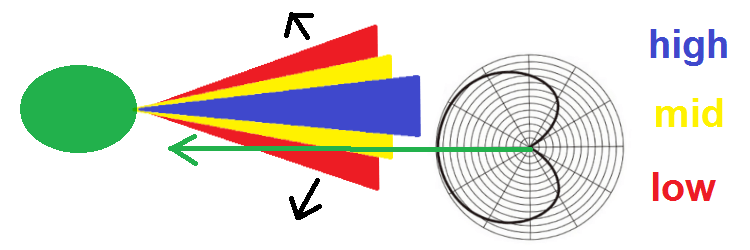
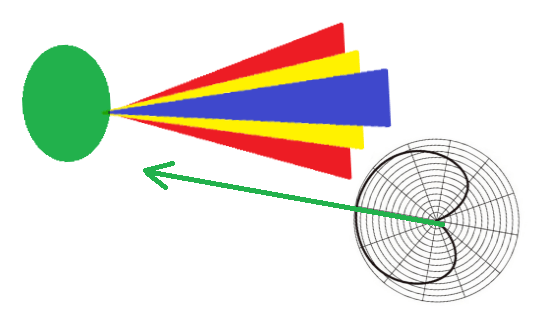
worse if you don’t speak directly into the microphone: Microphones
generally pick up high frequencies better when sound comes directly
at them. This is true even for so called "omnidirectional"
microphones. There is a significantly increased on-axis response for
high frequencies. If you speak from the side, the high frequencies
are reduced or lost. This is even more pronounced if you speak
slightly off-center. As a result, speech immediately becomes much
harder to understand.
issues with audio compression A great part is also lost
during audio compression, both in terms of dynamic range and sound
quality. Nodaways streaming formats heavily reduce information which
was essential for recognition: In order to reduce data size, these methods
take advantage of the characteristics of human hearing and
selectively remove acoustic information that cannot be perceived or
better: Which is supposed to be irrelevant. As for an example a loud sound masks, for fractions of a second, sounds that occurred
shortly before (pre-masking) or shortly after (post-masking).
This creates a focus on loud signals, while quiet, masked signals
are suppressed. Consequently, strong reflections can lead to a
potential loss of important information. Many transient details are
lost this way. That makes the audio quality even worse. Headset usage
The recommendation for talking in small
rooms is to use a headset
micorophone to avoid room reflections and ensure a consistent
distance from the microphone and a consistent recording angle. This
keeps the sound and volume constant, so the audio processor doesn't
have to correct the volume. Furthermore, the compression doesn't
focus on the high levels and doesn't mask the finer details. To do
this, place the microphone next to your mouth but not directly in
front of it. Place it aside directing in 60° to 80° degree to the
mouth outside the
direction of speech, so that it is not struck by explosive sounds
such as B, P, and T. At this short distance, high frequencies
are still reproduced very well without being overemphasized, and
vibrations of the diaphragms caused by sudden loud sounds are
avoided. Audio Processing Issues Post sound processing should generally be
used with caution:
Conclusion and
Summary
|
| © 2007 J.S. |